Introducing Marketer Lab: Plan and Produce Marketing Videos, Shot by Shot
Turn a product, an idea or a script into a finished marketing video, from a 10-second ad to a 10-minute brand film. Marketer Lab plans the shots, keeps them connected and lets you preview before you finish in full HD.
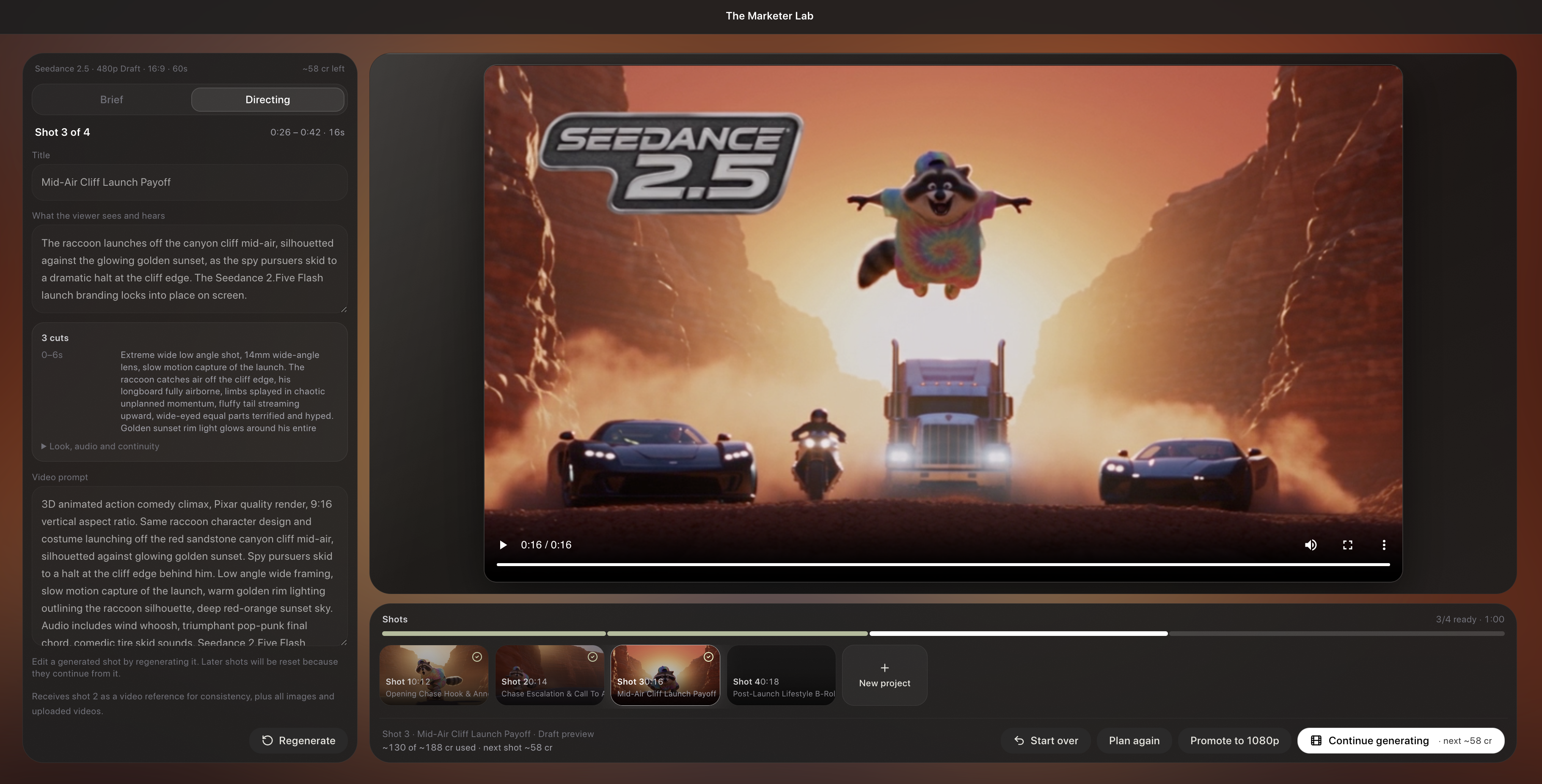
One video, planned like a campaign
A good marketing video is rarely a single clip. It is an opening that stops the scroll, a product that looks the same in every scene, a message that builds, and an ending that asks for something. Getting that from a single prompt is hard.
Marketer Lab is a new VeyoLabs workspace built around that problem. You bring a product, an idea or a script. Marketer Lab plans the video as a sequence of connected shots, then generates them one after another, so the result feels like one piece of work and not a pile of separate clips.
Who it is for
Marketer Lab is made for brands, agencies and marketing teams that need video often and need it to look consistent. It suits:
- Product ads and launches for physical goods, apps and software.
- Social media campaigns in vertical, square or widescreen formats.
- Fashion and beauty campaigns that depend on a consistent look.
- Food and hospitality promotions, from menus to venues.
- Real estate and travel films that show a place and its atmosphere.
- Brand and event films where a story runs for a minute or more.
- Agencies that want to show a client a concept quickly before committing to a full production.
How it works
- Write the brief. Paste a script or describe the idea. The brief can be as short as a sentence or as long as a full script.
- Add references. Upload product photos, a logo, footage or audio. These guide how the video looks and sounds.
- Choose the format. Pick a length from 10 seconds to 10 minutes, a screen shape (16:9, 9:16 or 1:1), a model and a resolution.
- Let the agent plan. Marketer Lab cuts the video into shots of 4 to 30 seconds. Each shot comes with a title, what the viewer sees and hears, the camera cuts inside it, the look and the sound.
- Review and edit. Read the plan on the shot timeline, change any shot, or ask the agent to plan again.
- Generate. Shots are generated one after another. Each new shot is given the one before it and your references, so the product, people and style stay connected. You can pause at any time and continue later.
Longer videos are planned in consecutive parts, so a 10-minute plan stays consistent from the first shot to the last.
Keep your brand consistent
Consistency is where most AI video breaks down: the bottle changes shape, the model changes face, the colours drift. Marketer Lab is designed to reduce that. Every shot is generated with your uploaded references and with the previous finished shot, and the plan records what has to carry over from one shot to the next.
For each shot you can choose how it relates to the one before it:
- New clip, same look. A fresh scene that stays consistent with the previous shot. This is the default.
- Continue the take. The shot carries on from where the previous one ended, for a longer unbroken moment.
As with any AI video, review each result. Check the product, text and logos before you publish.
Preview first, finish later
Video costs credits, and you rarely want to pay full price for a scene you may change. Marketer Lab shows an estimate before you generate and keeps a running count of the credits used.
With Seedance 2.5, you can generate shots as 480p drafts to check the story, pacing and framing. When you are happy, promote the shots you like to 1080p. Each final render is billed separately, so you only pay for full quality on the scenes you keep. If a single shot is not right, regenerate just that one.
Your projects are saved
Every Marketer Lab project is saved to your account automatically. Open the Projects menu to reopen an earlier video, start a new one or delete one you no longer need. A shot that was still generating when you left picks up where it stopped when you reopen the project.
Videos you generate also stay in your gallery.
Good to know
- Marketer Lab produces individual shots. You can play each one in the preview as it finishes.
- Use only images, footage and audio that you have the right to use.
- Credit costs depend on the model, the resolution and the length of each shot. Some options, such as drafts, depend on the model you choose.
- Marketer Lab is available to signed-in VeyoLabs accounts with an active plan.
Get started
Create an account or sign in, then open Marketer Lab from the dashboard. You can see how credits work on the pricing page and read about the rest of the platform on the products page.